
Not surprisingly facebook is using your browser history for social profiling and social marketing. Luckily there is a way to stop or make it a little more difficult for facebook to gather the information. This does not prevent facebook from utilizing your “like” history and “friends” list and their respective browser history – after all your friends play a part in your facebook profile. This is a two part guide:
Part I: Desktop Browser
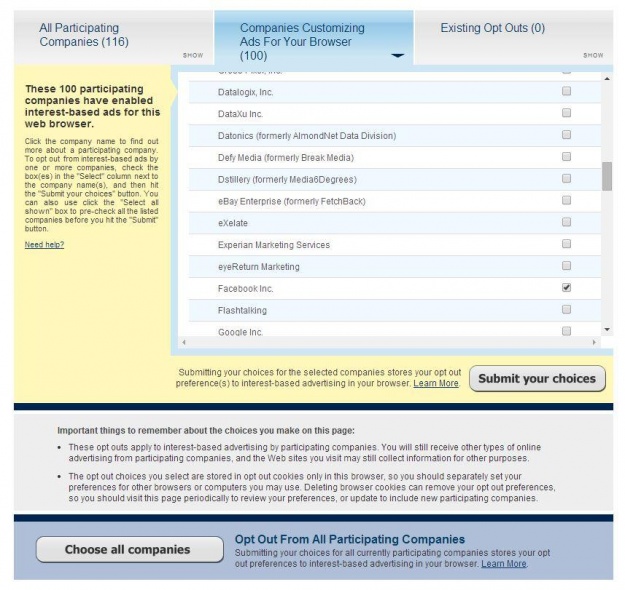
Step 1. Visit the web site of the Digital Advertising Alliance website. This is a beta service for online marketing opt-out – similar to telemarketing. However, the marketer has to be a participant in the service.
Step 2. Upon entering the site, your computer will be scanned for advertising participants that use for browser (meaning you will need to do this for each browser you use, Chrome, FireFox, Internet Explorer, etc)
Step 3. Select the Participating marketers you’d like to opt-out and cliek the “Submit” button. This will place a cookie on your browser. Note: it’s a cookie, deleting the cookie deletes your opt-out.
Part IIa: Mobile Browser (iOS)
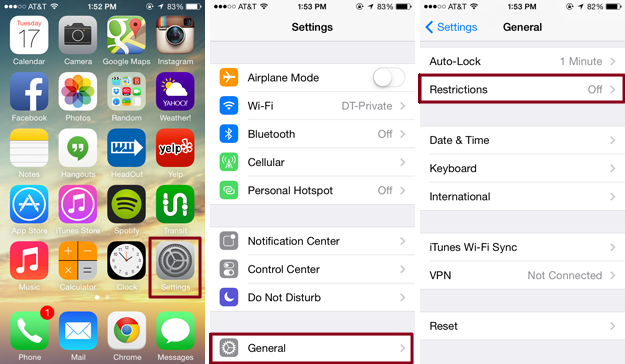
Step 1. Apple phones and devices like the iPhone and iPod that have the facebook mobile app installed also need to modify the app settings within the device itself. Click “Settings” from the main screen, then select “General”, now select “Restrictions” (You’ll have to be the admin for your phone or have the passcode if set).
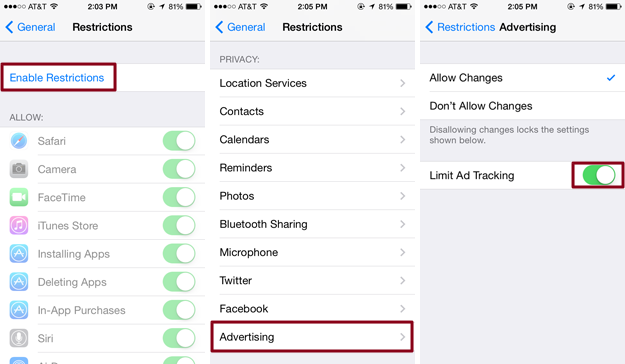
Step 2. Enable the Restrictions and enter a passcode (something you will remember). After the code is set, scroll to find “Advertising” and expand to see the options. You will want to select “Allow Changes” and turn on “Limit Ad Tracking” (so it’s green). Exit out and you should be set.
Part IIb: Mobile Browser (android)
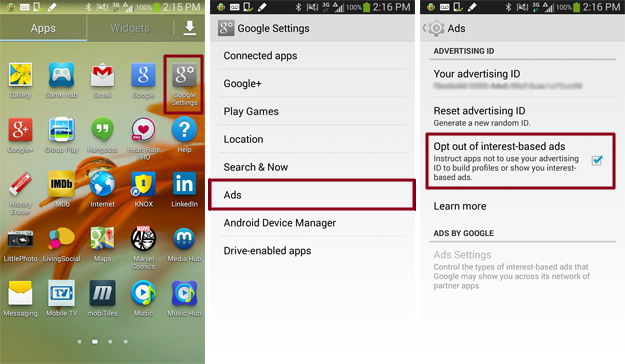
Step 1. From your android phone or device with the facebook app installed, go to your “Google Settings” app and select the “Ads” option. Place a check in the “Opt out of interest-based ads”, exit and you’re set.
Part IIc: Mobile Browser (windows)
Windows phones don’t currently provide an option to limit internet-based ads, sorry.